Localization Subteam
The localization subteam's goal is to create a system that allows Neatos to track their own poses within a known map and then publish those poses, to later be shared with each other.
For milestone 1, we did research and planning, tested the Neato's wheel odometry quality, created a map file, and identified an existing particle filter implementation from the AMCL robot localization package.
Research and Planning
We considered several strategies for Neato localization, including a particle filter, wheel odometry, and visual odometry. We thought wheel odometry would be the easiest to implement, since an odom topic that tracks the Neato's pose already exists in our setup. However, we were concerned that the odometry would drift over time and not be accurate enough for our purposes. To test this, we test drove the Neato around and mapped its odometry output.
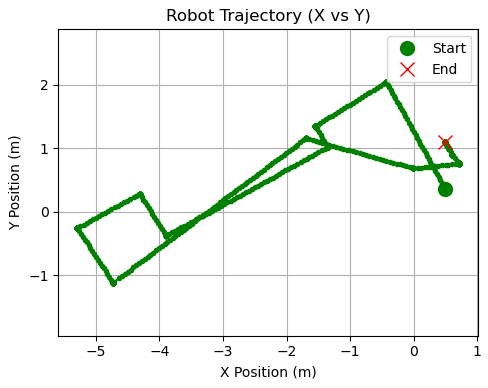
The figure above is a map of the path the Neato took. We started and ended at the exact same location; however, the odometry shows the start and end positions nearly a meter apart. This is not accurate enough, since games of Neato tag will likely be significantly longer than this test run, leading to even more drift. We decided to go with deploying a particle filter, because unlike odometry, particle filter results do not accumulate errors over time.
Map File
Particle filters require a map of the space to work off of. To create a map, we used the ROS2 SLAM Toolbox. We selected a small area in the 2nd floor MAC that had several defining features to test with.
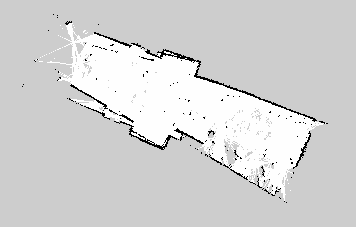
Map of Second Floor MAC in Between 213 and 218
Next Steps
Our next step is to deploy the ACML particle filter using this map file and test how accurate it is. This will also give us a sense of whether the MAC hallways have enough defining features for the particle filter to be able to accurately track the Neatos' locations. After that, we will reconvene with the rest of the team to discuss which features are priority to implement next.
Multi-Neato Subteam
The Multi Neato subteam’s goal for this milestone was to research and test how multiple Neatos can be run on ros2 from the same computer with the same package. In Neato tag, the chaser and escaper will need to follow different instructions, so we decided to create and run one teleop program on two Neatos, with one using WASD controls and the other using IJKL controls from the same keyboard.
Coding for two Neatos
We quickly learned that the most important part of giving different instructions to multiple Neatos would be to ensure communication doesn’t get crossed. In a teleops program for one Neato, there will be a publisher to cmd_vel, to allow the computer to send velocity instructions to the Neato. In a teleops program for two Neatos, each Neato will need a separate publisher to cmd_vel that will publish that Neatos specific instructions.
To prevent two cmd_vel publishers from getting crossed, they are differentiated by name spaces. So instead of:
self.vel_pub = self.create_publisher(Twist, ‘cmd_vel', 10)
We do:
self.vel_pub1 = self.create_publisher(Twist, 'namespace1\cmd_vel', 10)
self.vel_pub2 = self.create_publisher(Twist, ‘namespace2\cmd_vel', 10)
We modified a single Neato teleops program to use two publishers. Keypresses on w,a,s,d all trigger vel_pub1, while keypresses on i,j,k,l all trigger vel_pub2.
We have not been able to run this teleops on the Neatos yet, but we believe it will be a smooth process once we return from break.
Launching two Neatos
Instead of using the command:
ros2 launch neato_node2 bringup.py host:=IP_OF_ROBOT
We run two launch commands:
ros2 launch neato_node2 bringup_multi.py host:=IP_OF_ROBOT1 robot_name:=namespace1 udp_video_port:=5002 udp_sensor_port:=7777
ros2 launch neato_node2 bringup_multi.py host:=IP_OF_ROBOT2 robot_name:=namespace2 udp_video_port:=5003 udp_sensor_port:=7778
When launching one Neato, bringup.py is used to automatically handle arguments such as udp_video_port, but when launching multiple Neatos, bringup_multi.py requires different arguments for each robot. This is why the command takes extra arguments.
By using these commands, we were able to successfully launch two neatos!
Next Steps
Our next steps are to run the teleop code when we return from break, then tag up with the other subteams and share what we’ve learned.
Machine Vision Subteam
The machine vision subteam’s goal is to create a program that utilizes the Neato's camera and LIDAR sensors to play tag. We are focused on being able to create an autonomous chaser Neato (“it”) to recognize, track, and chase another Neato (chasee).
Research and Planning
Our plan is to use either color detection or the YOLO computer vision algorithm to have the "it" Neato recognize another Neato. Then, once the Neato is recognized, we use SORT object tracking to determine where the other Neato has moved so the "it" Neato can chase. SORT is a great algorithm for this project because it is able to track objects across frames and predict movement, meaning even if the chasee Neato moves out of sight our “it” Neato can still follow it. After identifying and tracking the chasee, we will use LIDAR data to determine the distance between the robots so we can more accurately calculate linear and angular velocity.
Before we started implementation, we wanted to see how well the Neato LIDAR can detect another Neato as we were told this might be a challenge. We discovered that the Neatos cannot see each other in their LIDAR because the Neatos are too low to the ground. To allow our “it” Neato to see the other Neato with LIDAR, we plan to add something to the Neato, like notecards, to elevate the Neato’s height. We plan to use brightly colored notecards so we can potentially pivot the recognition portion of our machine vision pipeline from YOLO to a color detection one, which is much easier and may be a more reliable approach. One caveat to adding something to the chasee Neato is that it will block the chasee Neato’s own LIDAR. This will prevent the possibility of creating an autonomous chasee Neato using LIDAR. Since our MVP is to create just the autonomous “it” Neato, we do not foresee this as a major roadblock. If we do decide to continue with YOLO, we may retake our training images with the chasee Neato wrapped in high-contrast colors. This would give us a more usable dataset while still keeping the option of switching to color detection open.
Creating Training Images
If we do end up using YOLO, we require annotated images of Neatos. We spent some time taking 50 images from a Neato camera. Two are included below.
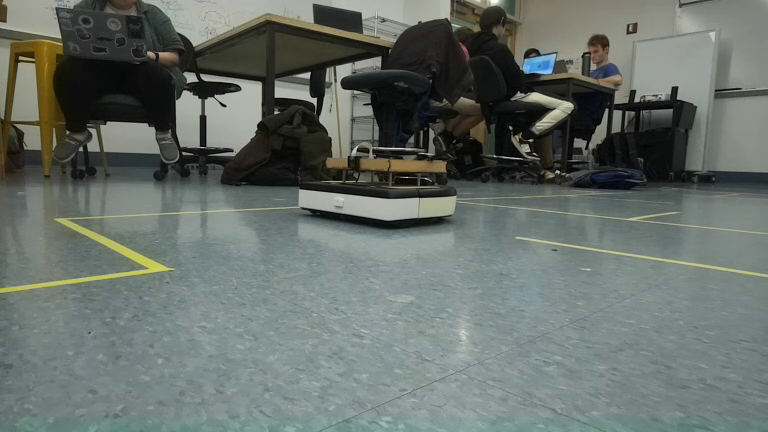
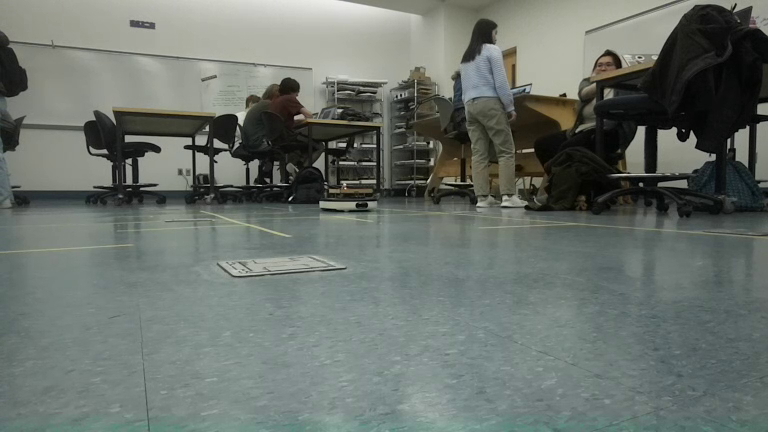
We are thinking of pivoting the recognition portion of our machine vision pipeline to an algorithm that relies on color detection as the images lack contrast. As you can see, in the second image the chasee Neato is only a couple yards away but it’s very difficult to see it. We could improve this by creating a more robust training set but that would take time away from implementation. Since we already plan to increase the chasee’s height using notecards, coloring them brightly would dramatically improve contrast. This would allow us to rely on color detection instead of YOLO, removing the need for training data altogether and letting us focus on integration and control. Alternatively, if we still want to pursue YOLO, we could retake the images for our training set with the high contrast colors, improving detection accuracy
Next Steps
Our next steps are to implement machine vision recognition and tracking. We plan on adapting the Neato Soccer code for color detection or following a YOLO tutorial if we go down that route. We also plan on looking into SORT to follow an object. Once we get the machine vision working, we would then figure out how to incorporate things with LIDAR to compute linear and angular velocity for chasing the chasee Neato.